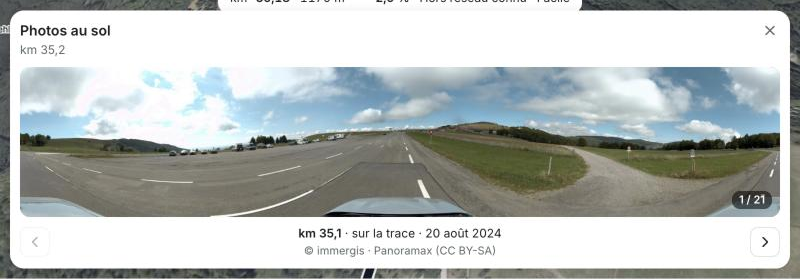
Carte des photos au sol (Panoramax) du point ou du passage choisi, pour voir le terrain réel ; n’apparaît que s’il y a des photos à montrer.
stableÀ valider
Installation
Copie le fichier dans ton projet, ainsi que les tokens qu’il utilise.
import { useEffect, useState } from 'react';
import type { BaseAnalysis } from '../lib/analyze';
import { photosAlong, type GroundPhoto } from '../lib/photos';

export interface PhotoTarget {
  /** portion de trace [a, b] ; a === b pour un point */
  a: number;
  b: number;
  label?: string;
  key: number;
}

interface Props {
  base: BaseAnalysis;
  target: PhotoTarget;
  onClose: () => void;
  /** photo affichée, pour la repérer sur la carte */
  onPhoto: (p: GroundPhoto | null) => void;
}

type State = { status: 'loading' } | { status: 'error' } | { status: 'ok'; photos: GroundPhoto[] };

const fmtKm = (m: number) => (m / 1000).toFixed(1).replace('.', ',');
const fmtDate = (iso: string) => {
  const d = new Date(iso);
  return Number.isNaN(d.getTime()) ? '' : d.toLocaleDateString('fr-FR', { day: 'numeric', month: 'short', year: 'numeric' });
};

/** Photos au sol (Panoramax) du point ou du passage sélectionné, pour voir le terrain réel. */
export default function PhotoCard({ base, target, onClose, onPhoto }: Props) {
  const [state, setState] = useState<State>({ status: 'loading' });
  const [i, setI] = useState(0);

  useEffect(() => {
    const ctrl = new AbortController();
    let alive = true;
    setState({ status: 'loading' });
    setI(0);
    const timeout = setTimeout(() => ctrl.abort(), 15_000);
    photosAlong(base.samples, target.a, target.b, ctrl.signal).then(
      (photos) => alive && setState({ status: 'ok', photos }),
      () => alive && setState({ status: 'error' }),
    );
    return () => {
      alive = false;
      clearTimeout(timeout);
      ctrl.abort();
    };
  // la géométrie seule compte : la fin de l'analyse (LiDAR, chemins) ne relance pas la recherche ni ne revient à la photo 1
    // eslint-disable-next-line react-hooks/exhaustive-deps
  }, [base.samples, target.a, target.b, target.key]);

  const photos = state.status === 'ok' ? state.photos : [];
  const photo = photos[i] ?? null;
  useEffect(() => onPhoto(photo), [photo, onPhoto]);
  // précharge les photos voisines pour une navigation instantanée
  useEffect(() => {
    for (const k of [i + 1, i - 1]) if (photos[k]) new Image().src = photos[k].sd;
  }, [i, photos]);
  useEffect(() => () => onPhoto(null), [onPhoto]);

  const single = target.a === target.b;
  const where = target.label ?? (single ? `km ${fmtKm(base.d[target.a])}` : `km ${fmtKm(base.d[target.a])} → ${fmtKm(base.d[target.b])}`);

  // la carte n'apparaît que s'il y a des photos à montrer : ni pendant la recherche, ni si Panoramax n'a rien
  if (!photo) return null;

  return (
    <div className="photo-card" role="region" aria-label="Photos au sol">
      <div className="photo-card-head">
        <div>
          <b>Photos au sol</b>
          <span>{where}</span>
        </div>
        <button onClick={onClose} aria-label="Fermer les photos" title="Fermer (Échap)">
          <svg viewBox="0 0 20 20" width="16" height="16" fill="none" stroke="currentColor" strokeWidth="1.8" strokeLinecap="round" aria-hidden="true">
            <path d="M5 5l10 10M15 5L5 15" />
          </svg>
        </button>
      </div>

      <a className="photo-frame" href={photo.viewer} target="_blank" rel="noopener" title="Ouvrir dans Panoramax (vue 360°, photos suivantes)">
        {/* la vignette (légère) s'affiche pendant le chargement de l'image moyenne */}
        <img key={photo.id} src={photo.sd} style={{ backgroundImage: `url("${photo.thumb}")` }} alt={`Photo au sol, km ${fmtKm(base.d[photo.idx])}`} />
        {photos.length > 1 && (
          <span className="photo-count">
            {i + 1} / {photos.length}
          </span>
        )}
      </a>
      <div className="photo-foot">
        <button onClick={() => setI((k) => Math.max(0, k - 1))} disabled={i === 0} aria-label="Photo précédente">
          <svg viewBox="0 0 20 20" width="16" height="16" fill="none" stroke="currentColor" strokeWidth="1.8" strokeLinecap="round" strokeLinejoin="round" aria-hidden="true">
            <path d="M12.5 4.5L7 10l5.5 5.5" />
          </svg>
        </button>
        <div className="photo-meta">
          <b>km {fmtKm(base.d[photo.idx])}</b> · {photo.dist < 8 ? 'sur la trace' : `à ${Math.round(photo.dist)} m`}
          {photo.date && ` · ${fmtDate(photo.date)}`}
          <br />
          <span>© {photo.author ?? 'contributeurs'} · Panoramax (CC BY-SA)</span>
        </div>
        <button onClick={() => setI((k) => Math.min(photos.length - 1, k + 1))} disabled={i >= photos.length - 1} aria-label="Photo suivante">
          <svg viewBox="0 0 20 20" width="16" height="16" fill="none" stroke="currentColor" strokeWidth="1.8" strokeLinecap="round" strokeLinejoin="round" aria-hidden="true">
            <path d="M7.5 4.5L13 10l-5.5 5.5" />
          </svg>
        </button>
      </div>
    </div>
  );
}
Utilisation
import PhotoCard from './components/PhotoCard';

{photoTarget && <PhotoCard base={base} target={photoTarget} onClose={closePhotos} onPhoto={setPhoto} />}
Anatomie
| # | Élément | Rôle |
|---|---|---|
| 1 | En-tête | « Photos au sol », le lieu (km ou portion) et le bouton Fermer. |
| 2 | Photo | Lien vers la vue 360° de Panoramax ; la vignette légère s’affiche pendant le chargement de la photo. |
| 3 | Pied | Photo précédente et suivante, km de la photo, distance à la trace, date, auteur et licence. |
Guidelines
- MUSTCiter l’auteur et la licence (CC BY-SA) de chaque photo.
- SHOULDNe rien afficher pendant la recherche ni quand Panoramax n’a pas de photo ; pas de carte vide.
Référence de l’API
| Prop | Type | Défaut |
|---|---|---|
base | BaseAnalysis | requis |
target | PhotoTarget | requis |
onClose | () => void | requis |
onPhotophoto affichée, pour la repérer sur la carte | (p: GroundPhoto | null) => void | requis |